A web form, a Facebook ad, a WhatsApp message, a missed call, a spreadsheet somebody keeps. Whichever way a lead gets in, the same five things happen to it — and where it came from stops mattering the moment it lands.
One module, 3 products. Sold separately almost everywhere else as pipeline, form & webhook capture and sequences.
Pick a channel and see exactly what arrives
And then, whatever the channel
01QueuedCapture writes to a queue, not straight to the table, so a burst of traffic cannot drop a lead.
02DeduplicatedChecked against what you already hold before the insert, so one person filling in two forms is one lead.
03AttributedUTM source, medium, campaign, content and term are kept as real fields — not buried in a notes blob.
04AssignedEach source carries its own owner, so the lead has a name against it before anybody opens the app.
05Owed a next stepA follow-up with a date, which then turns up on a due list and an overdue list. Nothing waits on memory.
The actual product
What the sales desk opens on.
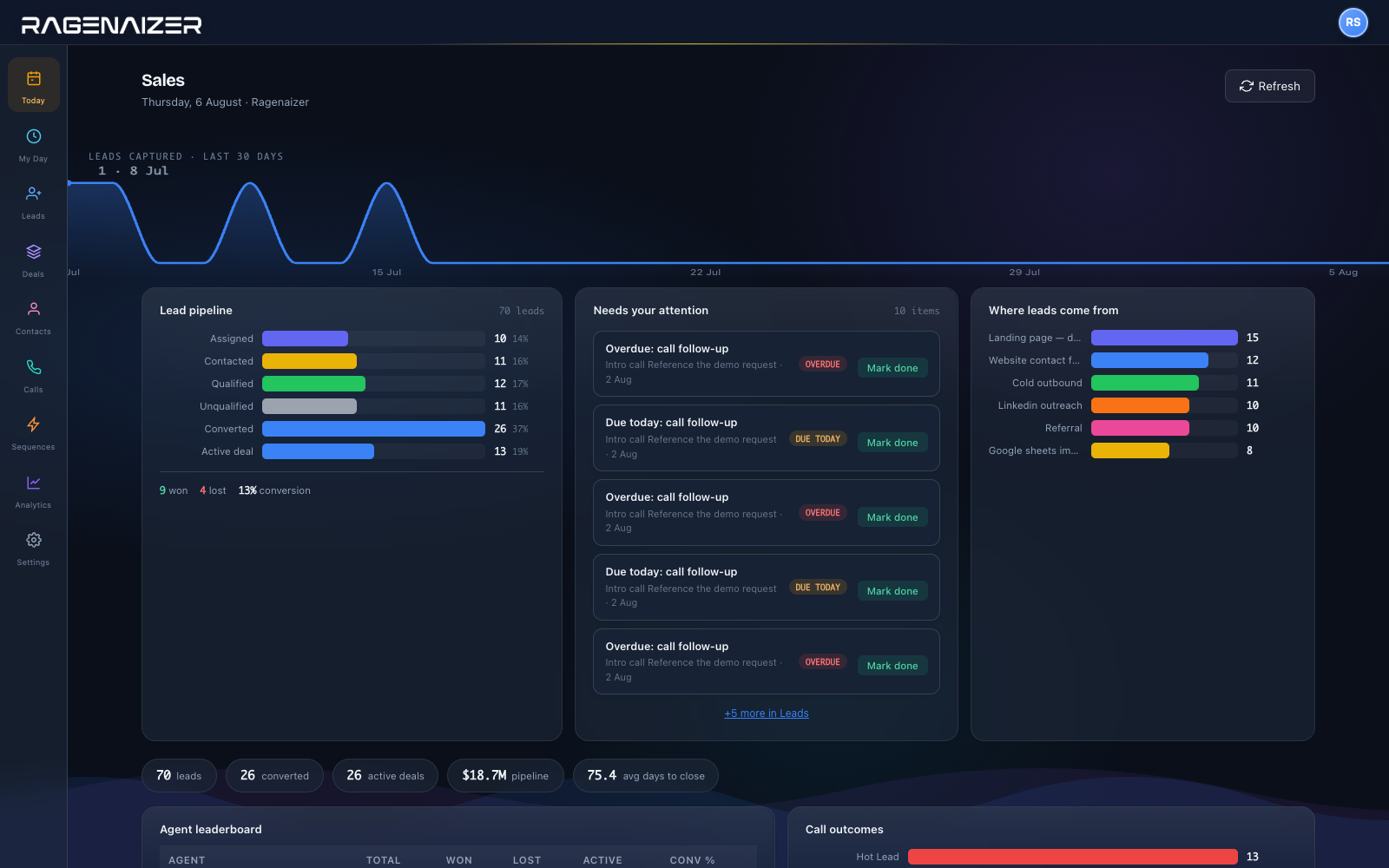
The pipeline as it stands, the follow-ups that are due and the ones already overdue, and where this month's leads actually came from — before anybody has run a report.
Sales — pipeline by stage, what needs chasing today, and the sources actually producing leads.
One thread
Everything that happened, on the lead.
Calls, messages, mail and meetings are not four systems reporting to a CRM. They are the same record, which is why the history is complete without anybody logging activity as a chore at six o'clock.
09:12
Form submitted on the pricing page, deduplicated and assignedWeb form · utm_campaign recorded
owner set
09:14
Called back from the browser, recording and duration on the leadPhone · click to call
4m 20s
09:31
Details sent on WhatsApp, replied to inside the windowWhatsApp
replied
11:40
Proposal emailed from a template, and opened twiceMail · tracked
2 opens
15:00
Demo held — the meeting room is in the same platformMeetings
recorded
17:22
Marked won — the customer record is created in the booksCRM → Accounts
no re-keying
one lead, five channels, one history0 integrations to maintain
What it covers
The rest of the sales desk.
Everything a small sales team otherwise buys separately, and a few things they usually go without because the tool that offered them wanted a second subscription.
PipelineDeal stages you define, dragged along a board, with won and lost recorded against a reason rather than quietly disappearing.
TelephonyCall from the browser, take inbound calls onto the right lead, and keep an inbox of what came in with stats. Your provider's credentials, held for you rather than by us.
WhatsAppConversations against the lead, and bulk sends when you have something a whole segment needs to hear.
Mail & sequencesA connected mailbox, templates, campaigns and multi-step sequences — with opens tracked so a follow-up is informed rather than hopeful.
Lead discoveryStart a discovery job and let it go looking, rather than paying a list broker for a spreadsheet that was stale when it was sold.
Campaigns, not just repliesBulk email to a segment from reusable templates, with opens and clicks tracked back onto the lead record rather than sitting in a separate marketing tool.
Getting leads inImport a file, pull from a Google Sheet, catch a webhook from any form, or take Facebook Lead Ads natively — with field mapping you set once.
The journey, end to endEvery touch on a lead in one timeline — the form it arrived on, the calls, the messages, the stage changes and who owned it when. The question "what happened with this one" has a screen.
Ads that learn from the closeServer-side conversion events go back to the ad platform when a lead actually converts, so the optimisation is against revenue rather than against form fills.
Custom fieldsAdd the fields your business actually qualifies on, and they arrive on the capture form and the lead record without a support ticket.
Teams & ownershipTeams with managers, per-source assignment, and transfer requests when a lead needs to move — so ownership changes leave a record.
Follow-upsEvery lead carries its next step with a date, surfaced as a due list and an overdue list. The pipeline stops being a place things go to be forgotten.
Forecast & reportsWhat is likely to close and when, off the same stages your team actually drags deals through rather than a parallel guess.
Won becomes a customerMarking a deal won creates the customer in Accounts — same name, same GSTIN, same record finance will invoice against.
Meetings insideThe demo room is in the same platform as the lead, so the recording and the transcript end up somewhere the next person can find them.
Activity trailNotes, tasks and activities on the record, plus the journey status and disposition history that says how a lead got to where it is.
Straight answers
The things people ask on the first call.
01
Can it capture from our existing website?
Yes, without rebuilding anything. Your form posts to a webhook key we issue; nothing about your site has to change beyond the endpoint it submits to. There is also a form configuration endpoint if you would rather we rendered the form.
02
What happens if two people fill in the same form?
Duplicates are checked before the insert, not cleaned up afterwards by a nightly job, so you do not end up calling one person twice from two records.
03
Do we lose the campaign a lead came from?
No. UTM source, medium, campaign, content and term are kept as first-class fields on the lead rather than swept into a custom-fields blob — so "which campaign actually produced revenue" is a query, not an archaeology project.
04
Who owns a new lead?
Whoever the source says. Each lead source carries its own assignment, so a lead has a name against it before anybody has opened the app — and transfers between owners are requests that leave a record.
05
Can we make calls from it?
Yes — click to call from the browser, inbound calls attached to the right lead, per-lead history and a call inbox with stats. You bring your own telephony account; the credentials are held in the platform’s key store and fetched at the moment of the call, never kept inside CRM.
06
Does it connect to Facebook Lead Ads?
Natively. You connect the page, map the form's fields once, and leads come through as leads rather than as a CSV somebody downloads on Monday.
07
What happens when we win?
The customer record is created in Accounts with the details you already captured. Sales never asks finance for a customer ID, and finance never types a company name for the second time.
08
Is a burst of traffic a problem?
Capture writes to a queue and is processed from there, so an ad that suddenly works does not cost you leads. There is a health view on the queue for the days when you want to watch it.
Stop losing leads between tools.
One record from the first form fill to the invoice — and a next step against every one of them.
This is one module of the business OS, not a point tool. CRM on its own does what is usually sold as three: pipeline, form and webhook capture, and sequences. The same seat opens Meetings, Mail, Chat, Drive, CRM, HR, Accounts, Projects, Procurement, Learning and Research — eleven modules covering about twenty-eight products' worth, on one login, one permission model and one ledger. You are not buying a CRM; you are putting the company on one system.