Your books post
as you work.
Invoices, bills, purchase orders, stock, work orders, counter sales and payroll all write their own entries. Batches and expiry, bills of material, a till and an ecommerce website are served by the same engine as the ledger — not four systems you reconcile on a Friday.
One module, 4 products. Sold separately almost everywhere else as books, inventory, expenses and an ecommerce API.
Pick a document below and watch what it does to the ledger
The document
What it posts, the moment it is approved
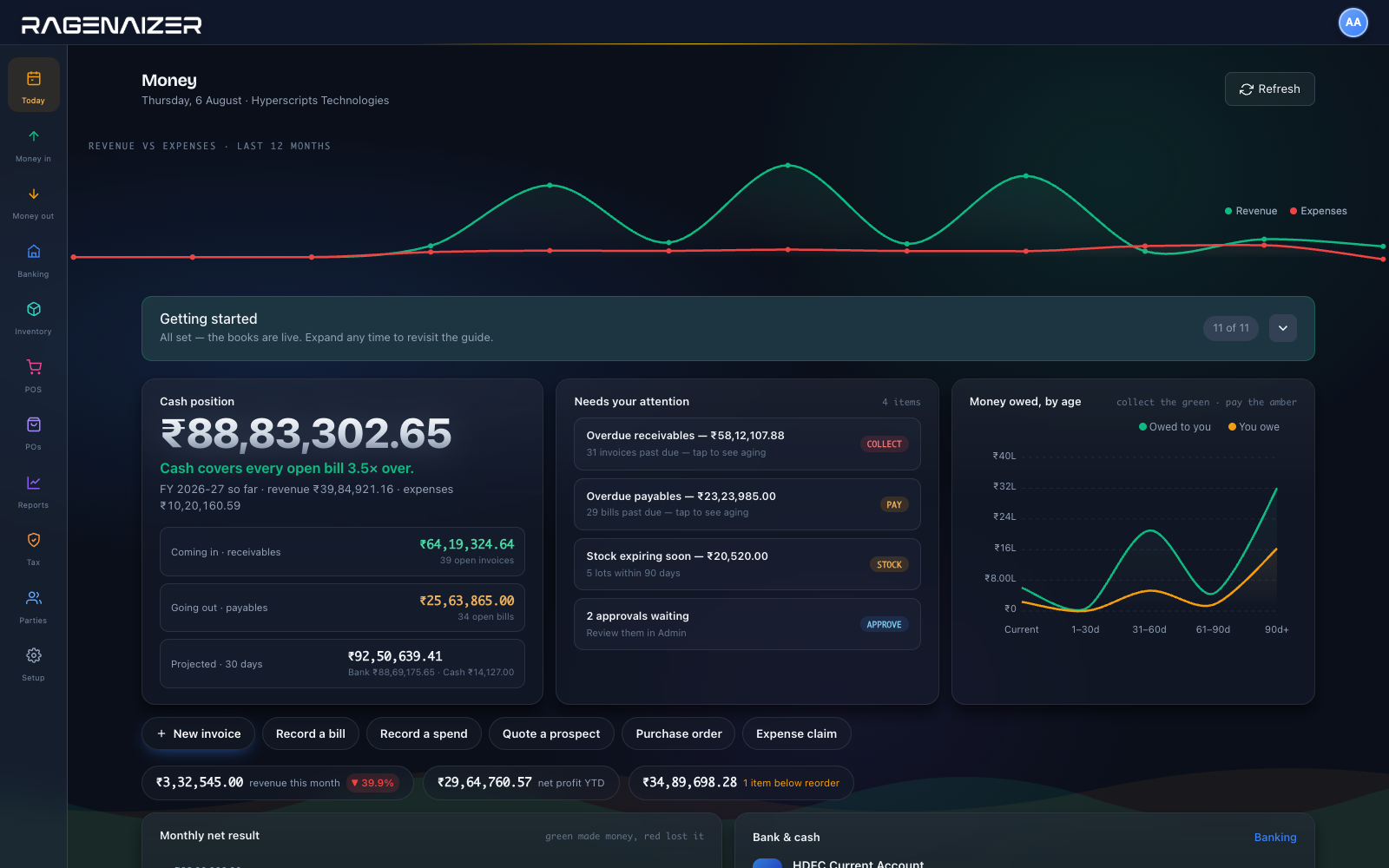
This is the first screen after you sign in.
Cash position, what is owed to you and by whom, what is going out, and the four things that need a decision today — before you have opened a single report.
Batches, work orders, a counter and a website.
Most accounting software stops at the invoice and hands you off to a second system for stock, a third for the shop floor and a fourth for the website — then asks you to reconcile all four. This is one engine. Pick how you sell.
Selling medicines? The pharma page goes deeper — FEFO, salts and substitutes, Schedule‑H and drug licences →
A finance department's worth of ground.
Not a light invoicing tool with an accounting label on it. Receivables through to year-end close, with the awkward parts — depreciation, metered billing, period locks, statutory returns — actually built rather than left to a spreadsheet.
A page for each of them.
Everything above has its own page, written against the code. Where something is not built, the page says so.
The rest of the company already feeds it.
The reason books go wrong is rarely the accounting. It is the retyping between the system that made the promise and the system that has to account for it. Here there is nothing in between.
The things people ask on the first call.
Is this real double-entry accounting?
Yes. Everything is a balanced journal against a proper chart of accounts — not an invoice list with a report bolted on. The engine refuses to post an entry whose debits and credits do not match, at both the line level and the entry header, so an unbalanced entry cannot exist in the ledger.
That is why the trial balance ties without being coaxed, and why the section at the top of this page can show you the entry behind any document.
Does stock agree with the books?
By construction. A stock movement and its ledger entry are the same posting, not two systems reconciled afterwards. The inventory account is maintained at weighted-average cost by the module itself — purchases debit it, sales credit it with the matching cost of goods sold — so its balance always equals the stock valuation report.
Can we run more than one currency?
Yes, off one chart of accounts. Currency sits on the invoice, bill, purchase order, asset and journal, with the exchange rate recorded on the document. Realised gains and losses post to their own account when a foreign receipt clears.
Can somebody backdate into a closed month?
Not once the period is locked. Fiscal years and periods lock explicitly, there is a closing checklist with line-item sign-off, and year-end close is a run rather than a convention. Reopening is itself an action with a name against it.
What can an auditor actually be given?
Every posting, approval, reversal and deletion is captured with the user, the timestamp and the before and after values, and the whole trail exports. Reversals are recorded rather than performed by deleting the original.
Is it GST-ready, or does that mean a CSV?
GSTR-1 with a JSON export, GSTR-3B, TDS and TDS-receivable reports over any date range, an HSN and SAC library, and one-click India setup. Tax configuration is per country, so the same engine handles VAT elsewhere.
E-invoicing is built but sits behind a GSP connection — we will not pretend it is switched on until yours is.
Are we locked in?
No. Your chart of accounts imports from CSV on the way in, every report exports on the way out, and the audit trail exports whole. Nothing about your books is held in a format only we can read.
Who is this actually for?
Businesses that hold stock and would otherwise run two systems — pharma distribution, manufacturing, wholesale, a retail counter, an ecommerce website — plus any services business that wants its projects, payroll and books in one place. See the panel above for what each of those gets.
Stop running the business on spreadsheets.
Move to books the rest of your company already writes into — and see the entry behind every number.
This is one module of the business OS, not a point tool. Accounts on its own does what is usually sold as four separate products: books, inventory, expenses and an ecommerce API. The same seat opens Meetings, Mail, Chat, Drive, CRM, HR, Accounts, Projects, Procurement, Learning and Research — eleven modules covering about twenty-eight products' worth, on one login, one permission model and one ledger. You are not buying an accounting package; you are putting the company on one system.